|| เคถเฅเคฐเฅ€ ||

The OS That Always Has Your Back.
Two slots. One always safe. Bad update? One reboot back โ€” always.
Private ยท No ads ยท No tracking ยท Free

Tired of updates that break things? Shanios keeps a verified copy of your previous OS ready at all times โ€” if anything goes wrong, one reboot takes you back. No reinstall. No recovery USB. No lost afternoon. Works the same whether you're a student, a developer, a gamer, a corporate user, or switching from Windows for the first time. Community edition completely free ยท Zero telemetry ยท Open source ยท Built on Arch Linux ยท Made in India ๐Ÿ‡ฎ๐Ÿ‡ณ

Bad update? Reboot to undo it โ€” your previous working state is always one reboot away
Coming from Windows or Mac โ€” familiar apps pre-installed, no terminal needed for daily use
Gamer? Full Steam + Proton stack pre-installed on KDE โ€” play from first boot, no setup
Your data stays yours. No ads, no tracking, nothing phoning home.
Fingerprint login ยท Hibernation ยท Hardware auto-configured โ€” works out of the box
Enterprise-ready โ€” fleet deployment, GPG-verified images, 6 security modules, OEM licensing available
Bad update? One reboot undoes it โ€” previous OS always ready, no reinstall ever
Private by default ยท No ads ยท No tracking ยท Secure out of the box
Full Steam + Proton gaming stack ยท Android apps via Waydroid ยท Windows apps via Bottles
Enterprise & OEM-ready ยท Fleet deployment ยท GPG-verified images ยท Licensing available
100% open source ยท Every script public on GitHub ยท Community edition always free
Built in India ๐Ÿ‡ฎ๐Ÿ‡ณ ยท Indian languages pre-configured ยท เคญเคพเคฐเคค เคฎเฅ‡เค‚ เคฌเคจเคพ
1 Command to update the OS โ€” sudo shani-deploy. That's it.
1 Reboot to undo any update โ€” no reinstall, no recovery USB, no tech support call
0 Telemetry, ads, or tracking. No crash reports. Nothing phoning home.
0 Settings lost on update โ€” your files, apps, and config survive every OS change
~20 Minutes to install โ€” then everything works: Wi-Fi, printers, fingerprint, NVIDIA, sound
6 Security layers active from first boot โ€” more than any standard Linux distro
100% Open source โ€” every script public, GPG key on keyservers, nothing hidden

Download Shanios

Community edition โ€” open source, free, no account required. Enterprise & OEM editions available. Coming from Windows or Mac? Start with GNOME edition โ€” it's the most familiar.

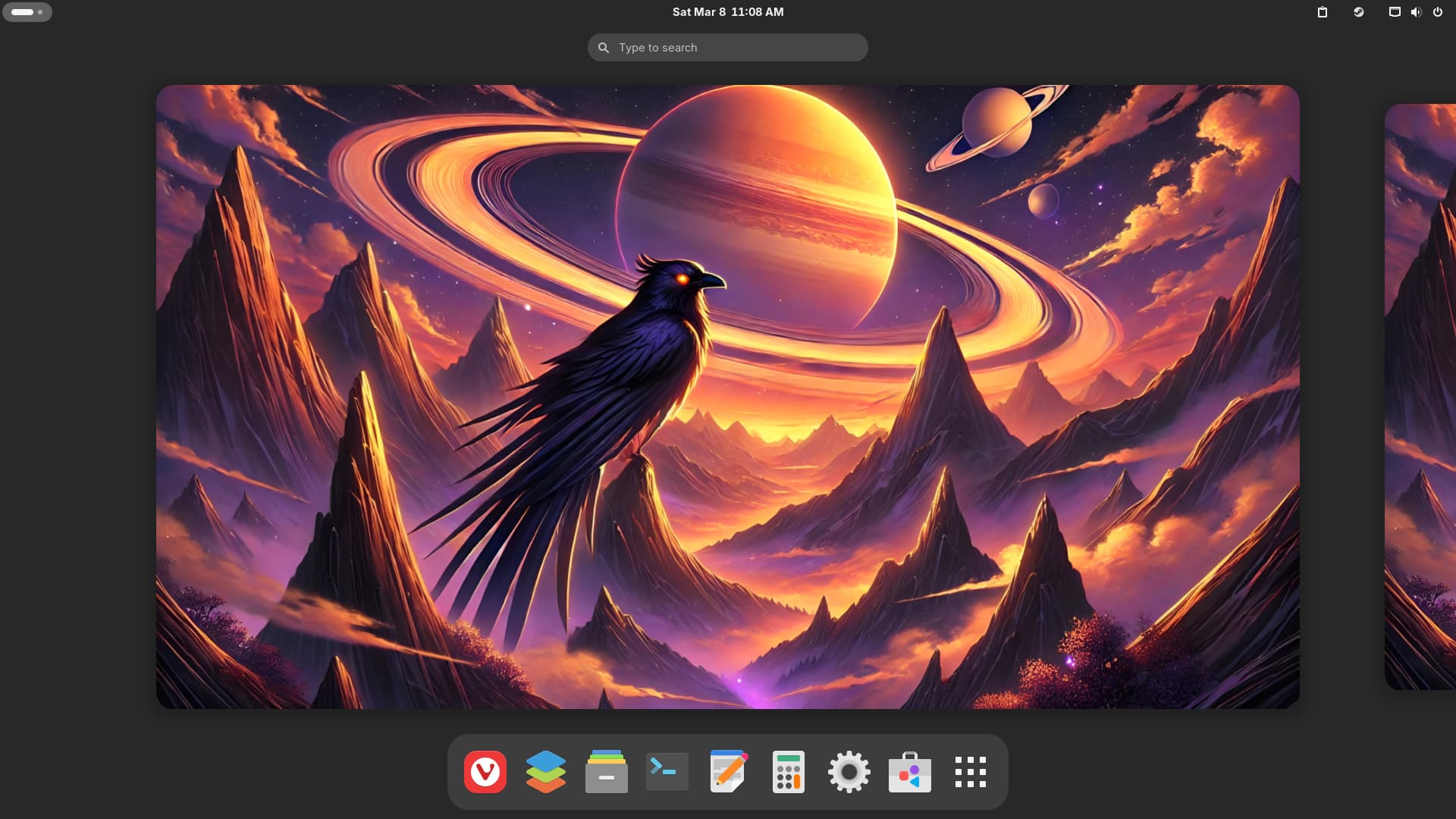
Shanios GNOME Edition desktop
Shanios GNOME Edition desktop screenshot

GNOME Edition

OEM-Ready Enterprise & Professional Recommended for Windows/Mac Switchers
Download GNOME โ€” Community Edition

Version 2026.01.18  ยท  ~5.5 GB  ยท  SHA256 + GPG signed

What's included

Clean, focused desktop โ€” best for work, students, and Windows/Mac switchers. OEM Initial Setup wizard, Plymouth BGRT manufacturer logo, GNOME Boxes for VMs, Rygel DLNA media server. Both editions include Vivaldi Browser, OnlyOffice (Word/Excel compatible), and Waydroid (Android apps).

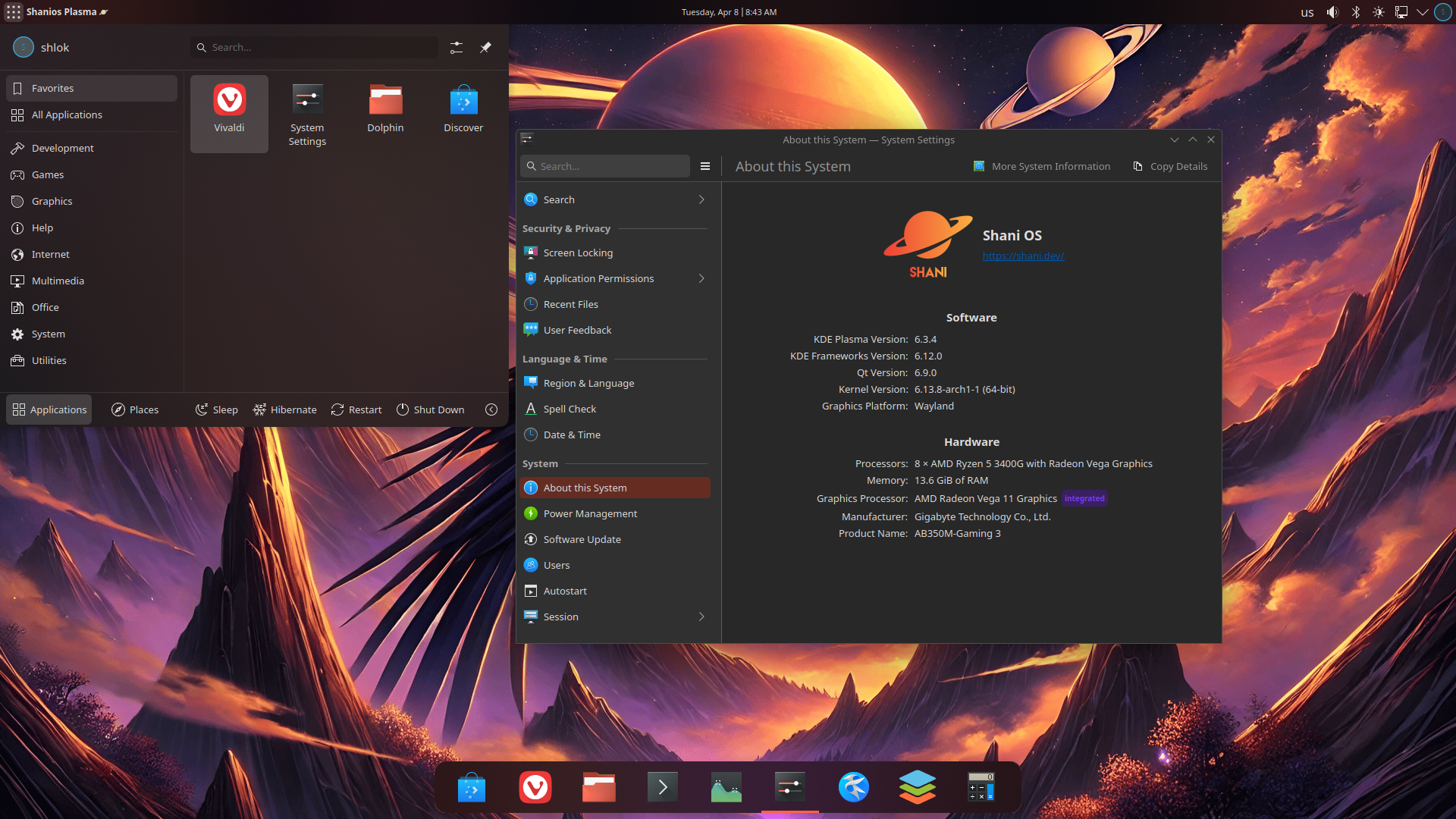
Shanios KDE Plasma Edition desktop
Shanios KDE Plasma Edition desktop screenshot

KDE Plasma Edition

OEM-Ready Power User & Gaming ๐ŸŽฎ Recommended for Gamers
Download KDE โ€” Community Edition

Version 2026.01.18  ยท  ~7.3 GB  ยท  SHA256 + GPG signed

What's included

๐ŸŽฎ Best for gamers and power users. Steam, Heroic (Epic/GOG), RetroArch, Bottles โ€” all pre-installed. NVIDIA configured at first boot. Kernel tuned for gaming (3072 Hz timers, GameMode globally active). Deeply customisable desktop. Both editions include Vivaldi Browser, OnlyOffice, and Waydroid. Everything ready at first boot, nothing to configure.

New to Linux? You're welcome here. Shanios is designed so you don't need Linux knowledge for daily use โ€” just a willingness to try. If you get stuck, the Telegram community is active and friendly. Start with GNOME edition โ€” it's the most familiar if you're coming from Windows or Mac.
Need an enterprise or OEM deployment? Private signed update channel ยท SLA support ยท Fleet management ยท OEM image customisation ยท Volume licensing. Get in touch.

Got the ISO? 5 steps to your first boot.

  1. 1
    Write to USB

    Use Balena Etcher (recommended), Rufus (Windows), or dd (Linux/macOS). Min 8 GB USB drive. Do not use Ventoy โ€” known compatibility issues.

  2. 2
    Quick BIOS check (before booting USB)

    Disable Fast Boot ยท Disable Secure Boot (re-enable after install) ยท SATA โ†’ AHCI ยท Enable UEFI ยท TPM 2.0 on if present. Access BIOS with F2, F10, or Del at startup. Most modern laptops and desktops only need Fast Boot and Secure Boot changed โ€” the rest are usually already correct.

  3. 3
    Boot from USB & install

    Hit F12 / F2 / Del at startup โ†’ select your USB โ†’ choose "Install Shanios" โ†’ follow the installer (~10โ€“15 min).

  4. 4
    First boot โ€” automatic setup

    Shanios configures everything automatically: disk layout, hibernation swap, both OS copies, and all hardware. Takes a few minutes. No commands needed โ€” just wait for your desktop to appear.

  5. 5
    Keep it updated

    One command: sudo shani-deploy. Downloads and verifies the new OS, prepares it in the background, then asks if you want to reboot. Your running system is never touched during this process.

How Shanios Updates Safely

Shanios always keeps two complete copies of your OS. You run on one. Updates happen on the other. When you're ready, you reboot into the new one. If anything is wrong, you reboot back. It's as simple as that โ€” everything below explains how it's made to be completely safe.

โ— Running Now
Your running OS (blue slot)
This is what you're using right now. It is never touched during any update or rollback โ€” not even by root.
/ โ€” the core OS (read-only, can't be modified)
/etc โ€” your config changes (always preserved)
/home โ€” your personal files (never touched)
/var โ€” service state (preserved across reboots)
Update
โ–ถ
new OS prepared here โ€” you keep running normally
Rollback
โ—€
restored from timestamped backup โ€” one reboot
โ†ป Staging Update
Standby OS copy (green slot)
The new OS is prepared here โ€” completely separate from what you're running. A safety backup is taken before any writing begins.
โ‘  backup current standby copy (timestamped)
โ‘ก download + verify new OS image (SHA256 + GPG)
โ‘ข old copy deleted only after new one succeeds
โ‘ฃ prepare boot entry โ€” your running OS unchanged
backup kept ready for instant rollback
Show step-by-step details
1

The updater updates itself first

Before doing anything else, shani-deploy downloads the latest version of itself from GitHub. If updated, it re-executes immediately with the new version โ€” so you always run current deployment logic, no matter how long ago you installed.

2

Your system is protected during the update

Shanios blocks sleep, shutdown, and lid-close for the entire update โ€” so nothing interrupts it. If the system is somehow powered off mid-update anyway, a recovery flag is detected on next boot and the interrupted update is cleaned up automatically before your desktop loads.

3

It checks which OS copy you're running

Before doing anything, the updater confirms exactly which OS copy you're running. If there's already a staged update waiting for a reboot, it reports that rather than proceeding โ€” preventing any accidental double-deploy.

4

Download & verify โ€” tampered files are rejected

The update image is downloaded from Shanios's primary server with multi-connection resume support โ€” so a slow connection or interrupted download picks up where it left off. If the primary server is unavailable, a SourceForge mirror is used automatically. SHA256 and GPG signature are both verified against the public key on keyservers before the image is ever extracted. A tampered or incomplete image is rejected outright โ€” the update aborts, nothing changes.

5

A safety snapshot is taken before anything is written

Before writing anything, a timestamped backup of the inactive OS copy is taken. The new image is then extracted into it. The old copy is only removed after the new one is confirmed complete. If power is cut mid-extraction, both your running system and the backup are fully intact โ€” nothing is lost.

6

The new OS copy is set up and boot is prepared

The new OS copy is packaged into a single verified boot image and registered as your next boot target. Your currently running OS remains the default until you choose to reboot โ€” nothing changes on your live system until then.

7

You decide when to switch โ€” no forced reboots

Reboot on your schedule โ€” immediately, or days later. The pending update waits in the background. Your currently running OS boots exactly as normal until you choose to switch. Once you reboot and the new OS starts up cleanly, everything is finalised automatically.

8

Changed your mind? Roll back anytime with one command

Run sudo shani-deploy --rollback from the OS you want to keep. Shanios restores the other copy from its last backup, re-registers it in the boot menu, and leaves your current system untouched. If a new OS ever fails to boot at all, the system detects this automatically and switches back before you see an error โ€” no action needed from you.

  Your files, apps, and settings are never touched by OS updates or rollbacks. Personal files, installed apps (Flatpak, Snap, Nix, containers, Waydroid), your config changes, network settings, SSH keys, and service state all live in separate storage โ€” completely independent of which OS copy is active. Hibernation works out of the box โ€” swap is automatically sized to your RAM at first boot, no setup needed. Two update channels: stable (default, tested builds ~monthly) and latest (most recent, more frequent). Switch with sudo shani-deploy -t latest.

Who Uses Shanios

Whether you're on Windows looking for something that doesn't surprise you, a developer tired of broken updates, a gamer, a sysadmin, or a school IT coordinator โ€” there's a reason Shanios fits your situation specifically.

The Developer

Your dev environment lives in a Distrobox container โ€” host OS updates atomically underneath it, the two never interfere. Use Ubuntu, Fedora, or any distro's toolchain in isolation. Test Android apps in hardware-accelerated Waydroid โ€” a full Android stack, not a slow emulator, no physical device needed. Run HPC workloads in Apptainer. Corporate VPN, fingerprint login, FIDO2/YubiKey, and smart card auth all work at first boot. Fewer broken updates, fewer lost deadlines.

The Researcher

Apptainer (the HPC standard) is pre-configured โ€” submit reproducible environments to clusters, share exact setups with collaborators, run isolated GPU workloads. The host OS itself is a GPG-signed, verifiable artifact: your full stack from kernel to container is reproducible and auditable, not just the workload inside it. Pair with an immutable host for a research environment that stays exactly as configured, indefinitely.

The Tired Linux User

You've reinstalled more times than you can count. You love Linux but you're done babysitting updates. Shanios gives you a rolling release's freshness with server-grade update reliability. When something goes wrong, you reboot โ€” not reinstall. Browser profiles run from RAM (Profile Sync Daemon), McFly gives your shell history a neural-network brain, and Btrfs compression cuts disk usage 30โ€“50%. The OS that earns trust by being boring.

The Linux Gamer

Steam, Proton, Heroic, RetroArch, Bottles โ€” all pre-installed on KDE Plasma. NVIDIA drivers configured at first boot. MangoHud, GameScope, vkBasalt, OpenRGB, AntiMicroX โ€” the full stack without setup pain. GameMode runs globally so every game benefits automatically. Kernel tuned for gaming: low-latency scheduler, 3072 Hz timers, expanded memory maps. Racing wheels (Logitech, Thrustmaster, Fanatec), VR headsets (HTC Vive, Valve Index, PSVR) โ€” all pre-configured. An OS update never costs you a gaming session.

The Corporate Laptop User

Fingerprint login, smart card, YubiKey/FIDO2, and NFC auth all work at first boot. Full enterprise VPN suite (WireGuard, OpenVPN, Cisco AnyConnect-compatible, Fortinet, IPsec), printers, scanners โ€” no setup required. Secure Boot, TPM2 auto-unlock, and LUKS2 argon2id full-disk encryption for compliance. Hibernation works out of the box. An immutable, GPG-verified OS that IT can audit. Everything a work machine needs, nothing to configure after imaging.

School Labs & Family Computers

Kids can install games, change settings, and browse freely โ€” but they cannot accidentally break the OS itself. A reboot always brings it back to a known-good state. School labs can stop reimaging between terms โ€” no summer overtime for your IT coordinator. Family computers stay stable no matter what a teenager does.

The Windows or Mac Switcher

Your familiar apps are here: Vivaldi or Firefox (browser), OnlyOffice (Word/Excel/PowerPoint, pre-installed), VLC, Flatpak apps from Flathub, and Windows software via Bottles. You do not need the terminal for daily use. What's different from Windows: software comes from Flatpak rather than .exe installers, and you run one command to update the OS. What's different from Mac: no locked ecosystem, no telemetry, full control. The transition is smaller than most people expect โ€” and the OS will never surprise you with a broken update the way Windows Update sometimes does.

Recognised Any of These?

These aren't Linux edge cases โ€” they're the reason people stick with Windows or keep reinstalling. Shanios is built specifically to make them stop happening.

"An update broke my computer. I spent the whole weekend trying to fix it."
How Shanios handles this
Shanios never touches your running system during an update โ€” it prepares the new version in the background. If anything is wrong, your previous working system is still in the boot menu. One reboot, and you're back. No fix required.
"I want to switch from Windows, but I'm scared of breaking something."
How Shanios handles this
With Shanios, the worst case is always: reboot to undo it. Every update can be reversed with one command. Your files, settings, and apps live in separate storage that no OS update or rollback ever touches. There is no "broke and have to reinstall" โ€” just reboot.
"My computer has been running for years and it's getting slower and weirder."
How Shanios handles this
Every Shanios update replaces the entire OS with a clean, verified image โ€” not patches on top of patches. There is no accumulation. Every user on the same channel runs the identical, fresh system.
"I opened too many tabs and my whole system locked up. Had to hard reset."
How Shanios handles this
Shanios includes an out-of-memory manager that runs system-wide. Under memory pressure it quietly terminates low-priority background tasks โ€” your active work keeps running. The system stays responsive instead of freezing solid, even on 4 GB RAM.
"I updated and now my dev tools are broken. I have a deadline tomorrow."
How Shanios handles this
Your dev environment lives in an isolated container. The host OS updates underneath it without touching it. The two are designed not to interfere. Your deadline is safe.
"I'm worried an update will break something. I keep putting it off."
How Shanios handles this
Update when you're ready โ€” rollback is always one command away. Not ready to commit? You can simulate the full update without changing anything first. Your previous OS is kept until the next update cycle.
"My laptop lost power mid-update. Now I'm not sure what state it's in."
How Shanios handles this
Shanios blocks sleep and shutdown during an update. If power is cut anyway, your running OS is completely untouched โ€” updates always happen in the background copy, never in the live one. Boot normally; your system is exactly as you left it.

Everything Shanios Brings

From the update engine and security stack to gaming, containers, and developer tools โ€” here is what you actually get, explained honestly.

How It Protects Your System

Updates That Never Break Your System

Every update runs in the background on a separate OS copy โ€” your live system is never touched. Reboot when ready to switch. Previous version stays available for rollback. You'll get a desktop notification when an update is ready.

shani-deploy prepares the standby OS copy: downloads the update, verifies its SHA256 + GPG signature, takes a safety snapshot first, extracts the new image, and registers it in the boot menu โ€” all without touching your running system.

The old candidate is deleted only after extraction succeeds. Sleep, shutdown, and lid-close are blocked for the duration of the update. A power cut mid-update leaves your current system completely untouched.

Two channels: stable (default, tested and validated builds โ€” new images released approximately monthly) and latest (newest available image, released more frequently, closer to cutting edge). Switch with -t latest. shani-deploy updates itself from GitHub before every run โ€” improvements reach you automatically.

Desktop update notifications โ€” when a new image is available, you get a GUI notification on your desktop. No need to remember to check; you decide when to run the update.

Deployment pending flag โ€” prevents data loss on power failure mid-update. If deployment was interrupted, the flag is detected on next boot and the update is safely resumed or cleaned up before the system reaches your desktop.

Always recoverable: your previous OS slot stays intact after every update. If the new slot doesn't work for you, sudo shani-deploy --rollback restores it โ€” no recovery media, no reinstall.

Background deduplication via beesd ensures shared data between @blue and @green is stored only once โ€” keeping two system copies costs far less than double the space. See Performance & Storage Efficiency for full details.

The OS Can't Be Broken โ€” Even by Root

The core OS is read-only so it stays exactly as shipped. Your config, files, and services live separately and are yours to change freely โ€” and they survive every OS update.

Immutable root (/) โ€” mounted read-only at runtime. Even a process running as root cannot modify core system files during a live session. The system that passed QA is the system that runs.

/etc as OverlayFS โ€” your config changes live in @data/overlay/etc/upper, layered over the read-only root. Changes survive updates and slot switches.

Services you enable persist. At boot, overlays mount first, then systemd daemon-reload runs โ€” so any unit you've enabled via systemctl enable survives every OS update exactly as expected.

/home and /root live in dedicated Btrfs subvolumes โ€” fully writable, shared between both OS images, unaffected by updates or rollbacks.

Selective /var management โ€” transient runtime state is cleared on reboot to reduce unnecessary writes and extend SSD lifespan. Important persistent state (NetworkManager, Bluetooth, printers, audio, Tailscale, fingerprint, TPM2 data, colord profiles) is preserved via bind mounts from @data and survives reboots unchanged.

@nix subvolume โ€” the Nix store is shared between both OS slots. Nix packages survive both updates and rollbacks, with no re-download required after switching slots.

Your Always-Available Fallback

Kernel panic. Bad driver. Ransomware attempt. Your previous verified system is one reboot away. No recovery media. No reinstall. No planning required. Boot failure triggers automatic rollback.

Before writing to the inactive slot, shani-deploy snapshots it as @{slot}_backup_{timestamp}. If the update fails at any point, an emergency rollback restores the candidate automatically.

Automatic boot failure detection โ€” a boot-counting pipeline (mark-boot-in-progress โ†’ bless-boot โ†’ mark-boot-success โ†’ check-boot-failure โ†’ startup-check dialog) detects if a new slot fails to boot successfully. If the new slot can't boot, systemd-boot automatically reverts to the previous slot โ€” without requiring any user action or recovery media.

Manual rollback: sudo shani-deploy --rollback from the slot you want to keep. Detects your active slot, restores the other from its latest snapshot, regenerates its UKI, and updates boot entries โ€” without touching your running system.

For OEM: rollback never requires reimaging. The previous slot is always in the systemd-boot menu โ€” no recovery media, no dispatch.

Your /home, apps, containers, and /etc config live in separate subvolumes โ€” OS rollback never touches them.

Security & Privacy

Defence-in-Depth Security Stack

6 Linux Security Modules simultaneously (Landlock, Lockdown, Yama, Integrity, AppArmor, BPF), LUKS2 argon2id, TPM2 auto-unlock, Secure Boot, Intel ME disabled, firewalld โ€” all on by default. No manual setup.

Immutable root โ€” even root cannot modify core OS files at runtime, limiting the blast radius of malware and misconfiguration. Full details in the Core Architecture section.

6 Linux Security Modules active simultaneously โ€” Shanios sets lsm=landlock,lockdown,yama,integrity,apparmor,bpf in the kernel command line. Most Linux distributions enable one or two; Shanios runs all of them concurrently:
โ€ข AppArmor โ€” mandatory access control, confines processes to files and capabilities they legitimately need
โ€ข Landlock โ€” filesystem sandboxing at the process level
โ€ข Lockdown โ€” restricts the kernel from modifications even by root
โ€ข Yama โ€” restricts ptrace scope and other process tracing
โ€ข Integrity (IMA/EVM) โ€” runtime file integrity measurement
โ€ข BPF LSM โ€” eBPF-based policy hooks for dynamic security enforcement

LUKS2 with argon2id โ€” full-disk encryption with a modern memory-hard key derivation function. Argon2id is specifically designed to resist GPU and ASIC brute-force attacks. Optional at install, strongly recommended for laptops.

TPM2 auto-unlock โ€” sealed LUKS keys tied to PCR (Platform Configuration Register) state. The disk unlocks automatically on trusted hardware without requiring a passphrase at every boot, while remaining locked against physical disk removal or hardware tampering. TPM data persists across blue/green slot switches.

Secure Boot via shim-signed, sbctl, mokutil โ€” verifies bootloader and kernel haven't been tampered with before the system starts.

Intel ME disabled โ€” the Intel Management Engine kernel modules (mei, mei_me) are blacklisted by default, removing Intel's remote management interface from the attack surface. This is a genuine privacy and security differentiator that most distributions do not do.

firewalld โ€” active from first boot. Zone-based firewall blocking all unsolicited inbound connections.

Flatpak sandboxing โ€” user apps get only the permissions they explicitly declare. No silent access to your home directory or system services.

Hardware security keys & smart cards โ€” FIDO2/U2F keys (libfido2), smart cards (opensc, ccid), and NFC (libnfc) all work out of the box. Use a YubiKey or similar for login and sudo authentication without any setup.

fwupd via LVFS โ€” keeps BIOS, NVMe, and peripheral firmware current. Outdated firmware is a major attack vector. Full details in the Hardware Support card.

No OS eliminates all risk. Network threats, zero-days in running services, and social engineering are outside what OS architecture alone can solve.

Zero Telemetry. Zero Ads.

Shanios collects no usage data, sends no telemetry, and shows no advertising โ€” ever. Intel ME disabled by default. Your machine is yours. No opt-outs required, nothing phoning home in the background.

Many operating systems โ€” including some Linux distributions โ€” include opt-out telemetry, crash reporters, or usage analytics that run by default. Shanios has none of this.

No background services report your hardware, software usage, or system behaviour to any server. No identifiers are generated or transmitted. No crash data is collected without your explicit action.

Intel ME disabled โ€” the Intel Management Engine modules (mei, mei_me) are blacklisted, removing the low-level hardware management channel that operates independently of the OS. See the Security card for full details.

The update tool (shani-deploy) connects to download servers to fetch images โ€” but sends only what any standard HTTP download requires. No system fingerprints, hardware IDs, or usage statistics are transmitted.

Because the entire codebase is public on GitHub, these claims are verifiable. You can read every script that runs on your system. No black box, no trust-us.

Supply Chain Integrity

Every image is SHA256 + GPG verified before deployment. The build system and deploy toolchain are public on GitHub, and the public GPG key is on public keyservers. Audit the entire chain of trust yourself โ€” no black box, no trust required.

Supply chain attacks โ€” where malicious code is injected between a trusted source and the end user โ€” are one of the most serious threats facing software today. Shanios's update model is designed with this in mind.

Every OS image is GPG-signed before distribution. Before shani-deploy extracts a new image, it verifies both the SHA256 checksum and the GPG signature. A tampered or corrupted image is rejected outright โ€” the update aborts, nothing changes.

The build system and deploy toolchain are public on GitHub. The GPG signing key is publicly registered so anyone can verify OS images independently. You can verify that the image you receive was produced by the published build process and signed by the correct key โ€” without trusting any single party's word.

Downloads come from the primary R2 server (downloads.shani.dev) with multi-connection resume support. If R2 is unavailable, the script automatically discovers a SourceForge mirror.

System Foundation

Arch Linux Rolling Base

Always-current software, latest kernels, newest compiler toolchains โ€” with immutable deployment providing the stability that rolling release normally sacrifices. Zsh + Starship + McFly neural-network shell history pre-configured.

Shanios runs the Arch Linux default kernel for broad hardware compatibility and up-to-date driver support. The Arch ecosystem delivers the newest compilers, runtimes, and developer tools without a fixed release cycle โ€” new drivers and kernels land before any fixed-release distro, without the manual maintenance Arch normally requires.

The immutable deployment layer gives rolling-release updates a verification step before they touch your active system โ€” significantly reducing the chance a broken upgrade reaches your running OS.

Default shell is Zsh with Starship prompt โ€” a fast, informative terminal prompt that shows git branch, exit codes, and environment context at a glance. Fish and Bash are also available.

McFly replaces standard shell history search with a neural network โ€” see the CLI & Developer Toolchain card for full details.

Pre-configured runtimes with isolated Btrfs subvolumes: Podman, Distrobox, LXC, LXD, Flatpak, Snap, Nix, Apptainer โ€” each isolated, each persistent across OS updates.

Avahi active by default โ€” machine reachable as hostname.local from first boot. See Networking for details.

Performance & Storage Efficiency

Btrfs zstd compression (30โ€“50% disk savings), Profile Sync Daemon (browser from RAM), zram swap, low-latency scheduler, MGLRU memory reclaim, continuous deduplication โ€” two OS slots cost far less than you'd expect.

Btrfs with zstd compression โ€” typically reduces disk usage by 30โ€“50% on all subvolumes including OS images. Fast decompression at read time means no perceptible performance penalty. The dual-image architecture adds significantly less overhead than double the space, thanks to Btrfs zstd compression and continuous deduplication via beesd.

Profile Sync Daemon (psd) โ€” browser profiles (Chrome, Firefox, Vivaldi, and others) run from RAM rather than disk. Web pages open faster, history loads instantly, and SSD write wear from day-to-day browsing is substantially reduced. Changes are synced back to persistent storage periodically and on shutdown.

zram compressed swap โ€” keeps the system responsive under memory pressure without touching the SSD. Compressed RAM swap is faster than disk swap by several orders of magnitude.

beesd deduplication runs as a systemd service, continuously deduplicating the entire shani_root filesystem. Shared data between @blue and @green is stored only once on disk.

MGLRU (Multi-Generational LRU) โ€” enabled with aggressive settings. The kernel's improved page reclaim algorithm makes better decisions about which memory pages to evict under pressure, significantly reducing stutter and swap thrashing on memory-constrained systems.

Volatile /var โ€” runtime state not worth preserving is cleared on reboot, reducing unnecessary disk writes. Important state is preserved via bind mounts from @data (see Immutable Root card for details).

CPU + I/O schedulers tuned for low-latency multitasking. Transparent hugepages (set to madvise) reduce memory management overhead for workloads that benefit from them without forcing it on all allocations.

systemd-oomd โ€” system-wide OOM daemon. Selectively terminates low-priority background processes under memory pressure, keeping your active work running instead of freezing the system.

Automated Btrfs maintenance โ€” monthly scrub (data integrity), periodic balance, defragmentation, and TRIM all run on systemd timers in the background. Your filesystem stays healthy without manual intervention.

Hibernation support โ€” a swapfile sized to your RAM is automatically created in a dedicated @swap Btrfs subvolume (Copy-on-Write disabled, as required for swap on Btrfs) during first deployment. Hibernate works out of the box on supported hardware โ€” no manual setup required.

systemd socket activation โ€” services like CUPS, Avahi, GPS daemon, and SANE start on-demand when first accessed rather than at boot. Faster boot, lower idle resource usage.

Hardware Support & Firmware Updates

Graphics, printers, scanners, Wi-Fi, Bluetooth, fingerprint, FIDO2 keys, smart cards, NFC, Thunderbolt, iOS โ€” all pre-configured. Firmware updates (BIOS, NVMe, peripherals) happen from within the OS โ€” no Windows, no USB boot drive needed.

Graphics: Intel, AMD, and NVIDIA drivers pre-installed and configured with full Vulkan support. All major Vulkan drivers included: Intel (ANV), AMD (RADV), NVIDIA open, nouveau, software (lavapipe), virtio-GPU, DirectX (dzn), and more. Works at first boot.

Printers & Scanners: CUPS with manufacturer-specific drivers, SANE for scanners with broad auto-detection support. Plug in and print.

Firmware updates via LVFS: fwupdmgr is included and configured for the Linux Vendor Firmware Service. Update BIOS, NVMe firmware, SSD controllers, keyboard firmware, and other hardware supported by LVFS with fwupdmgr update โ€” no manufacturer tools, no Windows, no USB boot drive required. Outdated firmware is a major security attack vector; Shanios makes keeping it current trivial.

Fingerprint readers (fprintd) โ€” biometric login and sudo authentication work at first boot on supported hardware. No setup required.

FIDO2/U2F hardware keys (libfido2) โ€” YubiKey and similar hardware security keys work for login, sudo, and web authentication without any configuration.

Smart cards (opensc + ccid) and NFC (libnfc) โ€” enterprise authentication methods work at first boot.

Thunderbolt 3 (bolt authorization) โ€” Thunderbolt device authorization is pre-configured. Connect Thunderbolt peripherals and docks without manual kernel parameter changes.

iOS devices (usbmuxd) โ€” iPhone and iPad file transfer and tethering work out of the box.

5G modems (ModemManager) โ€” mobile broadband connections via USB and PCIe modems are supported and managed through NetworkManager.

Hybrid GPU laptops โ€” nvidia-prime and switcheroo-control are pre-installed for systems with both integrated and discrete GPUs.

Hardware groups automatic: every user account is automatically added to all relevant groups โ€” containers, VMs, printing, scanning, and Nix all work without manual permission setup.

Desktop & Productivity

GNOME Edition โ€” Clean & OEM-Ready

Streamlined, distraction-free desktop for focused work and professional deployment. OEM Initial Setup wizard, Plymouth BGRT manufacturer logo, GNOME Boxes for VMs, Rygel DLNA media server. Both editions ship Vivaldi Browser + OnlyOffice.

A clean, distraction-free workflow built for productivity, business deployment, and OEM use. Streamlined application set, professional defaults.

OEM Initial Setup wizard โ€” first-boot experience that walks users through language, timezone, accounts, and preferences. Every device ships in an identical, known-good state. Pair with the immutable image model for fleet deployments with zero per-device configuration drift.

Plymouth BGRT boot theme โ€” the boot screen displays the device manufacturer's logo (from the UEFI BGRT table), then a clean password prompt for LUKS if encryption is enabled. Seamless firmware-to-desktop transition โ€” no technical messages, no blank screens. Ideal for OEM deployments where brand consistency matters.

GNOME Boxes (pre-installed as Flatpak) โ€” clean, minimal VM manager. VM disk images are sandboxed and unaffected by OS updates or rollbacks.

Rygel DLNA/UPnP media server โ€” stream media from your GNOME desktop to TVs and other DLNA-capable devices on your local network.

Both editions include: Vivaldi Browser, OnlyOffice, OEM Initial Setup wizard, Waydroid, all security features, and the full container/networking stack.

KDE Plasma Edition โ€” Power & Gaming

Deeply customizable desktop with the full gaming stack pre-installed. virt-manager + QEMU extension, BoxBuddy GUI, Pods GUI, Bottles. Kernel tuned for gaming with 3072 Hz timers and GameMode globally active. Both editions ship Vivaldi Browser + OnlyOffice.

A deeply customizable desktop for power users. Panels, themes, shortcuts, widgets โ€” tune everything without touching the immutable OS.

Full gaming stack pre-installed: Steam with Proton,Heroic Games Launcher (for Epic Games Store, GOG and Amazon Games), RetroArch, Bottles for Windows titles, MangoHud, GameScope, vkBasalt.

Kernel gaming optimisations: HPET/RTC timers at 3072 Hz, custom CFS scheduler slices (3000 ฮผs), expanded PID limits, memory maps, inotify watches. GameMode switches the CPU governor to performance on every game launch globally. Full details in the Gaming Performance card.

Ananicy-cpp background process priority manager โ€” automatically deprioritises background tasks the moment a game goes active. See Gaming Performance for full details.

virt-manager + QEMU extension (Flatpak) โ€” full VM lifecycle: networking, snapshots, storage pools, hardware passthrough. No system-level libvirt packages needed.

Bottles for Windows app compatibility. BoxBuddy GUI for Distrobox. Pods GUI for Podman.

Both editions include: Vivaldi Browser, OnlyOffice, OEM Initial Setup wizard, Waydroid, all security features, and the full container/networking stack.

True Internationalization

Indian scripts (Devanagari, Tamil, Telugu + more), full CJK, emoji, and IBus multi-language input โ€” all pre-configured. Designed in from day one, not bolted on.

Font coverage: Indian scripts (Devanagari, Tamil, Telugu, and more), full CJK (Chinese, Japanese, Korean) rendering, complete emoji support โ€” every script renders correctly without hunting for font packages.

IBus is the default input method โ€” seamless switching between dozens of languages and input methods while typing. Localized layouts and screen reader support included.

Indian language support is designed in from the start, not added as an afterthought. This is an intentional focus of the project, reflecting its origin in India โ€” where users shouldn't have to do extra work to use their native scripts on their OS.

Gaming

All gaming tools on the KDE Plasma edition. The same immutable reliability means an OS update gone wrong never interrupts your gaming โ€” rollback in one reboot. Kernel tuned with 3072 Hz timers, custom CFS slices, and expanded system limits for competitive gaming responsiveness.

Gaming Platforms

Steam + Proton, Heroic (Epic, GOG & Amazon), RetroArch, Bottles for Windows titles โ€” all pre-installed on KDE Plasma. Start playing from first boot. Android games via Waydroid are covered in the App Ecosystem section.

Steam with Proton โ€” play your Linux and Windows game library through Valve's compatibility layer. Pre-installed and configured.

Heroic Games Launcher โ€” access Epic Games Store, GOG, and Amazon Games libraries on Linux. Pre-installed.

RetroArch โ€” emulate classic systems from NES to PlayStation. Pre-installed with cores ready to download.

Bottles โ€” Windows app and game compatibility via Wine, with per-app prefixes, DXVK, VKD3D, esync/fsync, and snapshots. Installed as a Flatpak, fully sandboxed.

Gaming Performance Tools

MangoHud + GOverlay, vkBasalt, GameScope (VRR/HDR), GameMode globally active, Ananicy-cpp background process manager, low-latency kernel tuning with 3072 Hz timers. All included, all pre-configured.

Kernel gaming tuning โ€” HPET and RTC hardware timers set to 3072 Hz (default is 64 Hz). This dramatically reduces input latency and frame timing jitter โ€” a meaningful competitive advantage in fast-paced games. CFS scheduler time slices (3000 ฮผs), expanded PID limits, memory maps, and inotify watches are all configured for gaming workloads.

MangoHud + GOverlay โ€” overlay your FPS, GPU/CPU temps, VRAM usage, and frame times in-game. GOverlay gives you a GUI to manage MangoHud and vkBasalt profiles.

vkBasalt โ€” Vulkan post-processing layer. Apply sharpening (CAS, DLS), FXAA, or SMAA to any Vulkan game without modifying the game.

GameScope โ€” Valve's micro-compositor. Improves frame pacing and frame limiting. Supports adaptive sync (VRR/FreeSync) and HDR output โ€” HDR support is experimental, works best on AMD.

GameMode โ€” Feral's GameMode daemon runs globally. When a game launches, it switches the CPU governor to performance, raises process priority, and adjusts I/O scheduling. Works with Steam, Heroic, Lutris, and any launcher that supports it โ€” no per-game setup required.

Ananicy-cpp โ€” background process priority manager running at all times. The moment a game goes active, background tasks are automatically deprioritised. Your foreground stays smooth without manual nice/renice commands.

NVIDIA, AMD, Intel drivers pre-installed with Vulkan and OpenGL configured. Vulkan validation tools and Mesa utils included.

Gaming Peripherals

Racing wheels (Logitech G-series, Thrustmaster, Fanatec) with force feedback, VR headsets (HTC Vive, Valve Index, PSVR), Piper for gaming mice, OpenRGB, AntiMicroX โ€” all pre-configured, all working at first boot.

Racing wheels with force feedback โ€” Logitech wheels (G25, G27, G29, G920, G923, G PRO and more) are fully supported via in-kernel modules. Thrustmaster (T150, T300RS, T500RS, T248) and Fanatec wheels have udev rules and deadzone removal pre-configured. Force feedback works at first boot โ€” plug in and race.

Flight sticks & HOTAS โ€” Oversteer supports flight sticks and HOTAS controllers. Configure axis curves, deadzones, and force feedback profiles through a clean GUI.

VR headsets โ€” udev rules for HTC Vive, PlayStation VR, and Valve Index / SteamVR devices are pre-configured. Hardware access is available from first boot. VR is ready for SteamVR without additional setup.

Piper + libratbag โ€” configure gaming mice (DPI profiles, buttons, macros, LEDs) via a clean GTK interface. Works with all libratbag-supported mice โ€” Logitech G-series, Razer, SteelSeries, Roccat, and many more.

AntiMicroX โ€” map controller buttons and axes to keyboard/mouse inputs. Essential for games that don't natively support controllers, and useful as an accessibility tool.

OpenRGB โ€” control RGB lighting across motherboards, RAM, fans, keyboards, mice, and peripherals. Vendor-neutral, no manufacturer software required.

All hardware groups (input, realtime, video) are pre-configured so controllers and peripherals work immediately โ€” no permission issues.

Application Ecosystem

Multiple ways to install software โ€” all isolated from the OS core, all persisting in their own dedicated subvolumes. An OS update or rollback never breaks your installed apps.

Flatpak & Snap

Thousands of sandboxed apps from Flathub and the Snap Store โ€” both isolated in their own Btrfs subvolumes, both surviving every OS update. Flatpak auto-updates every 12 hours.

Flatpak โ€” sandboxed apps with controlled permissions. Install from Flathub โ€” the largest curated Linux app store. Apps live in a dedicated @flatpak Btrfs subvolume shared between both OS slots. Auto-updates every 12 hours via two independent timers (system-level and per-user), including unused runtime cleanup and automatic repair. Update manually: flatpak update

Snap โ€” snapd included and auto-enabled, backed by its own @snapd subvolume. Full Snap Store library alongside Flathub. Update: snap refresh

Both keep OS and apps in completely separate layers โ€” an OS update or rollback never affects your installed software.

Nix & AppImage

Nix for reproducible, conflict-free environments โ€” packages survive OS updates via the shared @nix subvolume. AppImages are self-contained portable executables that run directly without installation; Gear Lever is an optional GUI to manage them. Both persist across OS updates and rollbacks.

Nix โ€” reproducible package manager with daemon auto-enabled at boot. Isolates by environment rather than sandboxing โ€” apps share no conflicting dependencies. The Nix store lives in a dedicated @nix subvolume shared between both OS slots. This means your Nix packages survive both updates and rollbacks โ€” no re-download when switching slots. Update: nix-env -u or nix flake update

AppImages are self-contained portable executables โ€” every dependency is bundled inside a single file. No package manager, no installation, no modifications to the immutable OS root. Just download and run directly.

Gear Lever is an optional GUI for managing AppImages โ€” it is not required to use them. Use it to add desktop shortcuts, set launch-at-login, track updates, and remove AppImages cleanly. AppImage state is stored in a dedicated persistent bind-mount, surviving every OS update and rollback.

Android & Windows Apps

Run Android apps natively with Waydroid (hardware-accelerated on Intel/AMD, service enabled at boot, ARM translation included) or Windows apps through Bottles โ€” available on both editions, both persistent across updates.

Waydroid โ€” full Android container available on both GNOME and KDE editions. Hardware-accelerated on Intel and AMD GPUs; NVIDIA GPUs use software rendering. Service enabled at boot. System images and user data in a dedicated @waydroid Btrfs subvolume, preserved across OS switches. ARM translation included via the pre-installed waydroid-helper โ€” run ARM-only Android apps without needing a compatible device.

For Android developers: Waydroid is a full, hardware-accelerated Android stack โ€” not a slow AVD. Test your apps on real hardware-accelerated Android without a separate device.

Bottles โ€” Windows application compatibility via Wine, per-app prefix management, DXVK, VKD3D, esync/fsync, and snapshots. Installed as a Flatpak โ€” Windows apps isolated from the system and from each other. Available on both editions.

Containers & Virtualization

All container and VM storage in dedicated Btrfs subvolumes โ€” completely separate from the OS. Updates and rollbacks never touch your containers or VMs.

Dev Containers โ€” Distrobox & Podman

Distrobox + BoxBuddy GUI, Podman + Pods GUI, systemd-nspawn โ€” run any distro's toolchain without touching the host. Every container survives every OS update. Rootless by default.

Distrobox + BoxBuddy GUI โ€” run any Linux distribution in a desktop-integrated container. Ubuntu toolchain and Fedora toolchain side by side, no host modification. BoxBuddy provides a clean GUI for creating, managing, and entering containers. Containers survive OS updates untouched.

Podman + Pods GUI โ€” Docker-compatible, rootless container runtime, socket enabled at boot. Includes podman-compose, buildah, skopeo, podman-docker. The Pods app provides visual image and container management. Storage in @containers subvolume. Update: podman auto-update

systemd-nspawn โ€” lightweight OS containers managed via machinectl. Images stored in @machines subvolume. Ideal for testing OS configs or running isolated system services without a full VM's overhead.

LXC/LXD & Apptainer

LXC/LXD for full system containers (auto-enabled at boot), Apptainer for HPC and scientific workloads. Both pre-configured with persistent storage subvolumes. Pair with the immutable host for a fully auditable research stack.

LXC + LXD โ€” system containers for running full Linux distributions. LXD socket auto-enabled at boot alongside lxcfs. Persistent subvolumes (@lxc, @lxd). Run a complete Ubuntu or Debian server environment on your Arch desktop without a full VM.

Apptainer (formerly Singularity) โ€” the HPC and scientific computing standard. Submit reproducible environments to clusters, share exact environments with collaborators, run GPU workloads in isolation. Pre-configured on Shanios โ€” pair with the immutable host OS for a fully reproducible research stack where both container and host are verifiable artifacts.

Virtual Machines

GNOME Boxes on GNOME, virt-manager + QEMU extension on KDE Plasma โ€” both pre-installed as Flatpaks. Full VM management, sandboxed, VM disk images unaffected by OS updates or rollbacks.

GNOME Boxes (GNOME edition) โ€” clean, minimal VM interface. Runs fully sandboxed as a Flatpak; no system QEMU or libvirt required.

virt-manager + QEMU extension (KDE Plasma edition) โ€” full VM lifecycle: networking, snapshots, storage pools, hardware passthrough. Both installed as Flatpaks, fully sandboxed.

VM disk images are stored within the Flatpak sandbox data directory and are unaffected by OS updates or rollbacks.

All relevant groups are pre-configured โ€” VMs work at first boot assuming hardware virtualization (Intel VT-x / AMD-V) is enabled in BIOS.

Developer Tools, Networking & Backup

CLI & Developer Toolchain

Zsh + Starship (default), Fish, Bash โ€” with autosuggestions, FZF, and McFly neural-network history. Git, Subversion, Mercurial, and a complete suite of system, diagnostic, and network tools.

Shells & Search

Zsh (default, with Starship prompt โ€” shows git branch, exit codes, and environment context at a glance), Bash, Fish. Plugins: autosuggestions, syntax highlighting, history substring search, FZF.

McFly neural-network shell history โ€” replaces standard Ctrl+R with a neural network that learns from your patterns. Surfaces the most relevant commands based on current directory, recent activity, and exit codes. The longer you use it, the better it gets at predicting what you need.

Editors

Vim, Vi, Nano, Micro, Tmux, Ed, Less, Lynx

Core Utilities

Coreutils, Findutils, Grep, Gawk, BC, Diffutils, Patch, Time, Which, Texinfo

System & Monitoring

Htop, Fastfetch, Tree, Inxi, Dmidecode, Strace, Lsof, Ncdu, Sysstat, Smartmontools, Cronie, Logrotate, PV, JQ, Expect, Dialog

Version Control

Git, Subversion, Mercurial

Archive & Compression

7zip, Arj, Unrar, Unarchiver, Unzip, Zip, Lrzip, Lzop

GPU & Hardware Diagnostics

Vulkan-tools, Mesa-utils, Clinfo, Android-tools

Networking & Self-Hosting

Tailscale, Caddy, Cloudflared, OpenSSH, Fail2ban, Samba, NFS, dnsmasq, firewalld โ€” pre-installed, none active by default. Enable exactly what you need, nothing else exposed. All state persists across OS updates.

firewalld โ€” active by default from first boot. Zone-based firewall blocking all unsolicited inbound connections.

Enterprise VPN suite โ€” OpenVPN, WireGuard, L2TP, PPTP, strongSwan (IPsec), OpenConnect (Cisco AnyConnect-compatible), SSTP, and Fortinet (openfortivpn) are all pre-installed. Connect to any corporate network without hunting for packages.

Tailscale โ€” private WireGuard mesh network. Access your services privately across devices without public exposure. Activate on sign-in.

Caddy โ€” modern web server with automatic HTTPS. Host sites or dashboards locally or over Tailscale. Not active by default.

Cloudflared โ€” encrypted Cloudflare tunnel. HTTPS access to local services without a static IP or exposing your real address.

OpenSSH โ€” encrypted remote access. Not enabled by default. Recommended to run over Tailscale rather than publicly exposed.

Fail2ban โ€” automatic IP banning for repeated auth failures. Recommended alongside public-facing SSH. Not active by default.

Samba + NFS โ€” file sharing to Windows/macOS (SMB) and Linux/Unix (NFS). Both pre-installed; neither runs by default. All state persists across blue/green OS switches via bind mounts.

dnsmasq โ€” lightweight DNS forwarder, DHCP server, and split-DNS resolver. Configure local DNS for your home or office network โ€” point internal hostnames to local IPs, route only certain domains through VPN. Not active by default.

Avahi โ€” mDNS/DNS-SD active by default. Your machine is reachable as hostname.local from any device on the local network from first boot โ€” no router configuration, no DNS setup needed.

Network tools pre-installed: Nmap, Iftop, Bandwhich, Nethogs, Tcpdump, Traceroute, Rsync, Iperf3, MTR, Socat, OpenBSD Netcat, Curl, Wget, Aria2, Bind, Whois.

Backup & Cloud Sync

Restic for encrypted, deduplicated backups. Rclone for syncing to 70+ cloud providers. Firmware updates via fwupdmgr/LVFS. All backup state persists across OS updates.

Restic โ€” encrypted, deduplicated backups to local drives, SFTP servers, S3-compatible storage, and more. Backup repository metadata stored in a persistent bind mount โ€” backup history preserved across OS updates.

Rclone โ€” sync files to 70+ cloud providers (Google Drive, S3, Backblaze, OneDrive, and more). Remote config and mount state persist across blue/green switches so configured remotes remain available.

fwupdmgr + LVFS โ€” update BIOS, NVMe controllers, SSD firmware, keyboard firmware, and other hardware via the Linux Vendor Firmware Service with fwupdmgr update. Full details in the Hardware Support card.

How Shanios Compares

An honest comparison โ€” including where others win. Coming from Windows or macOS: Shanios never requires a reinstall to recover from a bad update, collects zero telemetry, and is completely free โ€” things neither Windows nor macOS offer. For Linux users comparing distributions: we highlight where others genuinely beat us too.

vs Windows & macOS

What matters to you Shanios Free ยท Open Source Windows 11 Microsoft ยท Paid macOS Sequoia Apple ยท Requires Mac hardware
Bad update recovery โœ“ One reboot โ€” alwaysPrevious OS copy stays intact; automatic rollback on boot failure. No reinstall ever. โœ— Reinstall or System RestoreWindows Update can break boot; recovery often requires USB media or reinstall Partial โ€” Time MachineFull system restore requires Time Machine backup + reboot into recovery
Telemetry & data collection โœ“ Zero โ€” verified in public codeNo usage data, no crash reports, no analytics. Intel ME disabled. Nothing phoning home. โœ— Extensive by defaultDiagnostic data, typing/inking telemetry, ad personalisation, Recall (AI screenshots). Opt-out buried in settings. โœ— SignificantUsage analytics, Siri data, iCloud integration, app usage reporting sent to Apple by default
Price Free โ€” alwaysCommunity edition is completely free. No licence key, no subscription, no trial. โ‚น14,999+ / $139+Home licence required. OEM copy tied to one machine. Pro costs more. Hardware cost: โ‚น90,000+macOS is free โ€” but requires Apple hardware. Cheapest Mac starts at ~$599 / โ‚น89,900.
Ads in the OS โœ“ None โ€” everNo ads anywhere in the OS or its tools. โœ— Ads in Start, File Explorer, lock screenMicrosoft increasingly places sponsored content and upsell prompts throughout the UI RareOccasional prompts to use Apple services (iCloud, Apple TV+); no banner ads
Your familiar apps โœ“ Pre-installed & compatibleBrowser, OnlyOffice (Word/Excel/PPT), VLC, Flatpak apps from Flathub, Windows apps via Bottles, Android apps via Waydroid โœ“ Native Windows appsFull Windows software ecosystem โ€” .exe installers, Microsoft Store, Office 365 โœ“ Native Mac appsApp Store, Homebrew, most professional creative tools (Adobe, Final Cut, Logic)
Gaming โœ“ Full stack pre-installedSteam + Proton, Heroic (Epic/GOG/Amazon), RetroArch, Bottles for Windows titles, NVIDIA at first boot โœ“ Best native supportLargest library, DirectX native, anti-cheat works everywhere โœ— Very limitedSmall library, no DirectX, limited GPU options, no competitive anti-cheat
Security architecture โœ“ 6 kernel security modules activeAppArmor, Landlock, Lockdown, Yama, Integrity, BPF โ€” all on by default. TPM2 + Secure Boot + LUKS2 argon2id. Defender + TPM2 + Secure BootGood baseline; frequent vulnerability disclosures; large attack surface from app ecosystem โœ“ Strong by defaultGatekeeper, SIP, AMFI, sandboxed apps. Tight hardware/software integration helps.
Read-only, tamper-proof OS core โœ“ Always โ€” even root can't modify itCore OS is read-only. Malware can't persist across a reboot to the other slot. โœ— Writable by admin/malwareSystem32 modifiable by elevated processes; rootkits can persist across reboots Partial โ€” SIP protects system dirsSystem Integrity Protection blocks most changes; not fully immutable
Hardware freedom โœ“ Any x86-64 PCWorks on any UEFI machine โ€” your existing hardware, no upgrade required โœ“ Any modern PCWide hardware support; some older CPUs dropped with Win 11 โœ— Apple hardware onlyLocked to Mac/MacBook. No choice of manufacturer, no upgrades on most models.
Terminal / command line needed for daily use โœ“ Not requiredGUI for everything. One command for OS updates if you prefer โ€” but GNOME Software handles it with a notification. โœ“ Not requiredFull GUI for all common tasks โœ“ Not requiredFull GUI for all common tasks; Terminal available for power users
Hibernation โœ“ Works out of the boxSwap auto-sized to RAM at first boot. Suspend-then-hibernate also configured. โœ“ WorksSupported; some driver/firmware issues on certain hardware Sleep-only on Apple SiliconTraditional hibernate not available on M-series Macs; Intel Macs support it
Open source & auditable โœ“ Fully openEvery build script, deploy tool, and signing key is public. Verify the full chain yourself. โœ— Closed sourceSource not available; security relies on trust in Microsoft โœ— Mostly closedDarwin kernel is open; everything above it is proprietary

Where Windows wins: native gaming anti-cheat, broadest .exe app compatibility, Microsoft Office native, DirectX.

Where macOS wins: Apple Silicon performance/battery, Final Cut/Logic Pro, tight hardware integration, iOS/iPad app ecosystem.

Shanios is not trying to beat either for every use case โ€” it's the right choice if you want a reliable, free, zero-telemetry, open-source daily driver on your existing PC hardware.

Feature / Criteria Shanios Arch ยท Blue-Green Traditional Linux Ubuntu / Arch / Fedora Fedora Silverblue OSTree ยท rpm-ostree Bazzite Fedora Atomic ยท Gaming SteamOS 3 Arch ยท Valve ยท Handheld Vanilla OS 2 Debian Sid ยท ABRoot NixOS Declarative ยท Nix
Update mechanism Full image swapBlue/green dual-slot โ€” running system never touched Package layeringModifies live system directly OSTree commitsrpm-ostree layering possible, adds complexity OSTree + layeringPre-layered gaming packages on Fedora Atomic Full image swapA/B partition, Valve-controlled, Steam Deck optimised OCI image swapABRoot v2 transacts between two root partitions Generation switchDeclarative rebuild via Nix
Instant rollback โœ“ Always availablePrevious slot untouched; one reboot โ€” same speed as normal boot. Automatic on boot failure. โœ— No rollbackManual fix or reinstall โœ“ OSTree historyPrevious commit in boot menu โœ“ OSTree historyUp to 90 days of deployments โœ“ A/B partitionPrevious slot in boot menu โœ“ ABRoot rollbackabroot rollback to previous OCI image โœ“ Boot generationSwitch generations at boot
Zero telemetry / no ads โœ“ Verified โ€” codebase is publicNo tracking, no crash reports, no analytics โ€” ever. Intel ME disabled by default. Varies by distroUbuntu has had opt-out telemetry; others vary โœ“ MinimalFedora opt-in countme data only โœ“ No telemetryInherits Fedora Atomic defaults Steam analyticsSteam hardware survey and usage data by default โœ“ No telemetryOpen source, no analytics โœ“ No telemetryCommunity project, no analytics
Cryptographic image verification โœ“ SHA256 + GPG, public key on keyserversEvery image verified before deployment โ€” independently auditable โœ— Package checksums onlyNo full-image GPG signing OSTree signingContent-addressed commits Signed container imagesInherited from Universal Blue / Fedora Atomic Valve-signed imagesClosed signing, not independently auditable OCI image integrityFsGuard checks binary integrity at boot Nix store hashesReproducible builds, content-addressed
Active kernel security modules 6 simultaneously activelsm=landlock,lockdown,yama,integrity,apparmor,bpf โ€” all enabled by default 1โ€“2 typicallyAppArmor (Ubuntu/Debian) or SELinux (Fedora/RHEL); rarely combined SELinuxOne LSM; strong but not combined SELinux + Secure BootInherits Fedora Atomic security defaults LimitedValve-managed; user-configurable security is restricted FsGuardBoot-time integrity; no kernel LSM stack by default ConfigurableNone by default; can be added via Nix config
TPM2 auto-unlock + Secure Boot โœ“ Both included & configuredTPM2 with PCR binding for passwordless LUKS unlock on trusted hardware; Secure Boot via shim/sbctl Manual setupPossible but requires significant manual work Secure Boot โœ“, TPM2 manualSecure Boot supported; TPM2 auto-unlock requires manual setup โœ“ Both supportedPre-configured on Bazzite LimitedValve-managed; limited user control Secure Boot โœ“LUKS2 at install; TPM2 integration varies ConfigurablePossible via Nix options; not default
OEM & deployment โœ“ Core design goalGPG-verified images, automatic boot-failure rollback, no-reimaging rollback, OEM wizard, BGRT boot logo โœ— Per-device driftNo standardised image model โœ— Not a focusNo OEM tooling or deployment story โœ— Gaming consumer focusNot designed for enterprise or OEM deployment PartialValve expanding to select OEM handhelds โ€” not general PC OEM OEM first-setup presentSetup wizard Reproducible configsPossible via NixOps / deploy-rs; steep setup
Software base / release cycle Arch Linux โ€” rollingAlways-current packages, latest kernels and drivers โ€” no 6-month wait VariesRolling (Arch) or fixed release (Ubuntu/Fedora) Fedora ~6-month cycleFixed release cadence Fedora Atomic ~6-monthGaming layer updated more frequently Arch โ€” Valve-curatedSlow to land on non-Deck PC hardware Debian Sid (near-rolling)Debian unstable branch NixOS stable / unstableStable = fixed; unstable = rolling
NVIDIA support โœ“ Works at first bootDrivers pre-installed; Vulkan/OpenGL included VariesOften manual driver install needed Supportedakmod-nvidia; can be tricky on rpm-ostree โœ“ Pre-installedProprietary NVIDIA drivers included and tested โœ— No official supportNVIDIA not officially supported on non-Deck hardware โœ“ Detected at installInstaller proposes NVIDIA OCI image if GPU detected Availablenixos.config.hardware.nvidia; manual but reproducible
Gaming stack included โœ“ KDE editionSteam, Heroic, RetroArch, Bottles, MangoHud, GameScope, vkBasalt, peripherals, VR, racing wheels, kernel tuned with 3072 Hz timers โœ— Manual setupInstall and configure everything yourself โœ— Not includedInstall via Flatpak manually โœ“ Primary focusSteam Gaming Mode, handheld-optimised, HDR, VRR โœ“ Deepest integrationValve's Proton, Gamescope, Steam Deck hardware-optimised โœ— Not includedInstall via Flatpak; no gaming defaults โœ— Manual setupPossible, no gaming defaults
Container runtimes pre-configured โœ“ Full ecosystem with GUIsPodman+Pods, Distrobox+BoxBuddy, LXC/LXD, Apptainer, systemd-nspawn, Nix โ€” each with own subvolume. Plus Flatpak, Snap, AppImage for app ecosystems. PartialInstall individually as needed Toolbox / DistroboxPodman included; others manual Distrobox + PodmanSome extras via ujust scripts Distrobox + PodmanPre-installed from SteamOS 3.5+ APX subsystemsDistrobox-based multi-distro containers via APX GUI Nix-nativeDocker/Podman via config; no UI defaults
Android apps (Waydroid) โœ“ Pre-configuredIntel/AMD hardware-accelerated, service enabled at boot, dedicated subvolume, ARM translation included Manual installPossible, no defaults โœ— Not includedโ€” โœ“ AvailableSetup guide; ARM translation included โœ— Not availableGaming-focused, no Android layer โœ“ Via VSO v2Waydroid + F-Droid, experimental โœ— Not includedโ€”
Hibernation out of the box โœ“ Auto-configuredSwap subvolume (CoW disabled) sized to RAM at first deployment โ€” hibernation works without any manual setup VariesUsually manual swapfile or partition setup required โœ— Manual setupNot configured by default PartialGaming-focused; hibernation not a priority โœ— Not supportedSteam Deck uses suspend, not hibernate PartialDepends on OCI image; not guaranteed ConfigurablePossible via Nix options; not default
Profile Sync Daemon (browser from RAM) โœ“ Pre-configuredBrowser profiles run from RAM โ€” faster page loads, less SSD wear, syncs back on shutdown โœ— Not includedManual setup required โœ— Not includedโ€” โœ— Not includedโ€” โœ— Not includedโ€” โœ— Not includedโ€” โœ— Not includedโ€”
Indian language support โœ“ Designed in from day oneDevanagari, Tamil, Telugu + more; IBus pre-configured AvailableAdd-on; quality varies by distro AvailableInstall separately AvailableInstall separately Not a focusGaming-oriented; no i18n defaults AvailableInstall separately AvailableConfigure via Nix options
Price Community: freeEnterprise & OEM licensing available โ€” contact us Freeโ€” Freeโ€” Freeโ€” Freeโ€” Freeโ€” Freeโ€”
Setup complexity Low โ€” works out of the boxOEM wizard, all hardware configured, no post-install tuning Low to HighDepends heavily on chosen distro ModerateNew paradigm; good docs; Fedora familiarity helps LowDesigned for approachable gaming setup Low (supported hardware)Seamless on Steam Deck; PC install is community-only ModerateNew tooling (ABRoot, APX, VSO); docs maturing HighDeclarative config, unique paradigm, steep curve

Reflects publicly documented behaviour as of early 2026 โ€” always check current docs before deciding.

Where others win: Bazzite/SteamOS for Steam Deck. NixOS for declarative reproducibility. Shanios is the right fit for general hardware, rolling-release reliability, NVIDIA at first boot, and zero telemetry.

Download Shanios โ€” It's Free

Two editions ยท SHA256 + GPG signed ยท Zero telemetry

Frequently Asked Questions

The questions people ask most before trying Shanios, answered directly.

Do I need to know Linux to use Shanios?
No โ€” not for everyday use. Both GNOME and KDE editions have full graphical interfaces for everything from settings to app installation. You do not need to open a terminal to browse, write documents, play games, or install apps. You will need one terminal command to update the OS: sudo shani-deploy โ€” that's it. If you want to go deeper (containers, Nix, custom configurations), Shanios gives you full access. If you don't, it stays out of your way. New to Linux? Start with the getting-started guide and feel free to ask questions in the Telegram community.
I'm coming from Windows. Will my apps work? Is this beginner-friendly?
Most of what you do on Windows has a direct equivalent: Firefox or Vivaldi for browsing (pre-installed), OnlyOffice for Word/Excel/PowerPoint documents (pre-installed, opens .docx/.xlsx/.pptx natively), VLC for media, and thousands more via Flathub โ€” the Linux app store. Windows apps can run through Bottles (Wine-based), which is pre-installed. You do not need to use the terminal to use Shanios for everyday tasks. The part that is different: software installs go through Flatpak or the app store rather than .exe installers โ€” once you understand that, the rest is familiar. Not sure? Ask in the Telegram community before you install.
Can I install software? The root is read-only โ€” does that mean I'm locked out?
Yes โ€” just not into the OS root, which is intentional. Use Flatpak (Flathub, sandboxed), Snap, Nix, AppImages (via Gear Lever), or any container via Distrobox, Podman, or LXC. All persist across OS updates in their own dedicated storage โ€” completely separate from the OS itself. Nix packages live in their own dedicated storage shared between both OS copies, so they survive updates and rollbacks. The point is that your apps and your OS are separate concerns โ€” an OS update can't break your apps, and your apps can't corrupt the OS.
Does Shanios need an account? Does it collect any data about me?
No account needed, no email, no registration โ€” just download and install. Shanios collects zero telemetry, sends no crash reports, and has no analytics of any kind. The update tool (shani-deploy) connects to download servers to fetch images โ€” but only transmits what any standard HTTP download requires. No hardware fingerprints, no system IDs, no usage statistics are sent. Intel Management Engine โ€” a low-level chip-level background process on Intel hardware โ€” is disabled by default, removing a known surveillance and attack surface. Because the entire codebase is public on GitHub, this is verifiable โ€” you can read every script that runs on your system.
Why does it need 32 GB minimum? That's more than most distros.
Shanios keeps two complete, bootable OS copies at all times โ€” that's how instant rollback works. Each copy is roughly 5โ€“7 GB. The filesystem uses compression (typically cutting OS size 30โ€“50%) and background deduplication so shared content between the two copies is only stored once. In practice the real extra overhead compared to a single-copy OS is about 18% โ€” not double. 64 GB gives comfortable room for apps and updates. You'll need at least 10 GB free to stage an update.
What happens if an update fails mid-way?
Nothing happens to your running system โ€” it's in a completely separate copy and is never touched during an update. Before any writing begins, a timestamped backup of the standby copy is taken automatically. If the update fails for any reason (network drop, power cut, verification failure), the standby copy is restored from that backup. If power is lost mid-update, the issue is detected automatically on next boot and cleaned up before your desktop loads. To undo a completed update: sudo shani-deploy --rollback.
Does it work on my hardware? NVIDIA? Older machines?
Shanios includes Intel, AMD, and NVIDIA drivers pre-installed and configured including full Vulkan support. Printers, scanners, Bluetooth, Wi-Fi, game controllers, fingerprint readers, FIDO2/YubiKey, smart cards, NFC, Thunderbolt, iOS devices, and 5G modems are all pre-configured. It runs the standard Arch Linux kernel with broad hardware support. Firmware updates (BIOS, NVMe, SSD, keyboard controllers) are handled automatically via the Linux Vendor Firmware Service โ€” no manufacturer tools or USB drives needed. Minimum: 64-bit x86 CPU, 4 GB RAM, 32 GB storage.
How do I keep everything updated โ€” OS, apps, containers?
Each layer has its own command: OS with sudo shani-deploy, Flatpak with flatpak update (also auto-updates every 12 hours), Snap with snap refresh, Nix with nix-env -u, Podman containers with podman auto-update, firmware with fwupdmgr update. These are completely independent โ€” updating apps doesn't touch the OS, and vice versa. Desktop notifications tell you when a new OS update is ready, so you never need to remember to check.
How do I roll back if the new OS doesn't work for me?
From the OS copy you want to keep, run sudo shani-deploy --rollback. Shanios restores the other copy from its most recent backup and updates the boot menu โ€” without touching your running system. If a new OS ever fails to boot at all, it's detected automatically and the previous one takes over โ€” no action needed from you. Your personal files, apps, and settings live in completely separate storage and are never affected by any OS rollback.
Is it good for laptops? Battery life? Hibernation?
Yes. Fingerprint login works at first boot on supported hardware โ€” no setup required. Hibernation works out of the box โ€” swap is automatically sized to your RAM during first-run setup, nothing to configure. TPM2 auto-unlock means you can use full-disk encryption without typing a password at every boot โ€” the disk unlocks automatically on your own trusted hardware. Your browser profile runs from memory (RAM) rather than writing constantly to your SSD, which measurably extends SSD life. Full-disk encryption (LUKS2) and Secure Boot are both fully supported.
Is it secure? What exactly is protected?
The system root is read-only โ€” even root can't modify core OS files at runtime. Updates are verified SHA256 + GPG before deployment. Six Linux Security Modules run simultaneously: Landlock, Lockdown, Yama, Integrity, AppArmor, and BPF LSM. Full-disk encryption protects all your data at rest using a modern, attack-resistant key algorithm (LUKS2 argon2id). TPM2 auto-unlock ties LUKS keys to hardware state. Secure Boot verifies the bootloader and kernel before the system starts. Intel ME is disabled by default. Flatpak sandboxes user apps. firewalld blocks unsolicited inbound connections from first boot. Zero telemetry means no analytics attack surface. That said โ€” no OS eliminates all risk. Network threats, zero-days, and social engineering are outside what OS architecture alone can solve.
Is it really open source? Can I verify how updates work?
Fully. The build system, shani-deploy scripts, and every tool that runs on your system are public on GitHub. The GPG signing key is publicly registered so anyone can verify OS images independently. In an era of supply chain attacks, that isn't a nice-to-have โ€” it's the point. You don't have to trust claims. You can read the code, verify the key, and reproduce the build. Full technical documentation is at wiki.shani.dev.
Who built this and why should I trust it?
Shanios is built by Shrinivas Vishnu Kumbhar โ€” a developer and researcher from Shivaji University, Kolhapur, India, with years of experience building Linux distributions and infrastructure tools. The project came from research into why server deployments stay reliable while desktop Linux so often doesn't โ€” and applying those same techniques to the everyday desktop. Trust is earned through transparency: everything is public, auditable, and on GitHub. Questions before you commit? Join the Telegram community โ€” the developer is active and responds personally.
Can I dual-boot with Windows?
Dual-booting is not recommended โ€” other OS bootloaders (including Windows Boot Manager) can overwrite or break Shanios's systemd-boot entries, particularly after Windows updates. The recommended approach is to install Shanios on a dedicated drive or partition and use BIOS/UEFI boot selection (usually F12 at startup) to choose which OS to boot. If you need Windows for specific software, Bottles (Wine-based compatibility layer, pre-installed) handles many Windows apps. If you still want to try dual-boot, the documentation covers it โ€” proceed with caution and back up your Windows data first.
Download Free Ask a Question First

No account ยท No telemetry ยท Still unsure? The community on Telegram is active and welcoming.

Support the Project

Shanios is independent, open-source software. Your support keeps development active and the project sustainable.

Other ways to help

Spread the Word

Why it matters

Star the project on GitHub, share it with admins and developers who are tired of reinstalling, or write about your experience. Word of mouth is how small open-source projects grow.

Star on GitHub

Contribute

How to contribute

Report bugs, propose features, improve documentation, or contribute code. Whether you're a developer, tester, designer, or technical writer โ€” every contribution matters.

Get Involved

Join the Community

What's in the community

Real-time support, announcements, tips, and discussion on Telegram. Fast responses, active community.

Join Telegram

About the Platform

Why this OS exists, what it stands for, and the person behind it โ€” so you know what you're installing and why it was built this way.

The Problem We Solved

Servers have stayed reliable for years by updating to a standby copy, verifying everything cryptographically, and rolling back instantly on failure. Regular desktop operating systems never did this โ€” and users paid for it with reinstalls, broken updates, and wasted weekends. Shanios brought that same reliability to the everyday desktop, without requiring you to understand any of the machinery underneath. The result: rollback in one reboot, strong security out of the box, and hibernation that just works โ€” as defaults, not add-ons.

Research Made Real

Shanios grew out of research at Shivaji University into why server deployments stay reliable while desktop OS updates so often fail. Years of building Linux systems shaped the architecture. The result is an OS that feels completely ordinary to use โ€” but recovers from any update failure with one reboot, instead of requiring a reinstall.

Radical Transparency

Every build script, deploy tool, and signing workflow is public on GitHub. The GPG signing key is on public keyservers. Supply chain attacks succeed when users have to take someone's word for it. With Shanios, you don't โ€” you can verify the full chain yourself, end to end.

Built in India ๐Ÿ‡ฎ๐Ÿ‡ณ

Shanios is built in India โ€” with Indian-language support (Devanagari, Tamil, Telugu, and more) designed in from the start, not added as an afterthought. Indian scripts render correctly on first boot, no packages to hunt for. IBus multi-language input is pre-configured. This is an intentional first-class feature, not an afterthought.

Honest About Tradeoffs

Shanios is not the right tool for everyone. For the deepest Steam Deck integration, use Bazzite or SteamOS. For full declarative reproducibility, use NixOS. The compare table on this page tells you where others genuinely win. We'd rather you pick the right tool than be oversold on the wrong one.

Core Philosophy

Your OS should be your most reliable tool โ€” not a source of anxiety. The best OS is the one you stop thinking about. Reliability and security shouldn't require expertise to configure. Zero telemetry shouldn't require an opt-out. Hibernation and TPM2 auto-unlock shouldn't require a wiki deep-dive. Shanios aims to deliver all of this as sensible defaults, for everyone, with nothing hidden. The OS that earns trust by being boring.

Download Free

Open source ยท Built in India ๐Ÿ‡ฎ๐Ÿ‡ณ

Built for Enterprise & OEM

The same architecture that keeps a developer's laptop reliable scales to a fleet of thousands. Zero-touch deployment, cryptographic verification, and instant rollback are not add-ons โ€” they are the foundation Shanios is built on.

Zero-Touch Fleet Deployment

Every machine in a fleet pulls from the same GPG-signed image. No per-machine package drift. No "works on most of them" support calls. When a new image ships, every machine either runs it or rolls back automatically โ€” with no manual intervention required.

Cryptographic Trust Chain

Images are signed with a GPG key published on public keyservers. SHA256 checksums are verified before deployment. The signing key, build scripts, and deployment tooling are all public and auditable โ€” independently, by anyone, at any time. This is how supply chain security should work.

Rollback Without a Dispatch

A bad update on a remote machine doesn't require on-site recovery. Boot-counting detects a failing slot automatically and reverts before the user sees a problem. For machines that do get to the desktop: one command, one reboot, previous state restored. No recovery USB. No reinstall. No truck roll.

OEM-Ready Out of the Box

OEM Initial Setup wizard, Plymouth BGRT manufacturer logo, hardware-specific profiles, and pre-configured drivers for Intel, AMD, and NVIDIA โ€” all included. Shanios ships as a complete, verified, deployable image. No per-model post-processing required.

Security That Passes Audits

Immutable root, 6 active Linux Security Modules, LUKS2 argon2id full-disk encryption, TPM2 auto-unlock, Secure Boot, Intel ME disabled by default, and firewalld active from first boot. The attack surface is minimized by architecture, not by configuration โ€” so it stays minimized regardless of what an end user does.

Made in India โ€” Built for Indian Scale

Indian-language support (Devanagari, Tamil, Telugu and more) designed in from day one. Positioned for Indian enterprise, government, and OEM deployments that need a credible, domestic, open-source platform โ€” not a rebranded foreign product with telemetry baked in.

Discuss OEM & Enterprise

Enterprise & OEM licensing available โ€” community edition is always free and open source

Roadmap

Where Shanios has been, where it is now, and where it is going. Built in public โ€” every milestone tracked on GitHub.

โœ“ Shipped

Foundation

  • Atomic blue-green Btrfs updates
  • GPG + SHA256 image verification
  • Immutable root with OverlayFS /etc
  • TPM2 auto-unlock + LUKS2 argon2id
  • 6 Linux Security Modules
  • Intel ME disabled by default
  • Hibernation auto-configured
โœ“ Shipped

User Experience

  • GNOME & KDE Plasma editions
  • OEM Initial Setup wizard
  • Full gaming stack (KDE)
  • Waydroid Android layer pre-configured
  • All container runtimes with GUIs
  • Desktop update notifications
  • Script self-update mechanism
โœ“ Shipped

Developer Platform

  • Distrobox + Apptainer pre-configured
  • Podman + Flatpak + Snap + Nix + AppImage
  • Stable + latest update channels
  • Dry-run mode for all operations
  • rollback, cleanup, storage-info flags
  • Power-failure safe deployment
  • R2 CDN + SourceForge mirror fallback
โ–ถ In Progress

Enterprise Infrastructure

  • Fleet management tooling
  • Private update channel infrastructure
  • Controlled rollout scheduling
  • Compliance audit documentation
  • Enterprise support SLA framework
โ†’ Next Up

Security & Attestation

  • Remote attestation support
  • Measured boot integration
  • Reproducible build verification
  • SBOM (Software Bill of Materials)
  • CVE tracking dashboard
โ—Ž Planned

Platform Expansion

  • ARM64 / Snapdragon X Elite support
  • Immutable server edition
  • Cloud image (AWS, GCP, Azure)
  • Installer CLI for headless deploy
  • OEM partner portal
Follow on GitHub

All development is public. Issues, PRs, and discussions are open.

Your OS should be the most reliable tool you own. Shanios keeps a verified copy of your previous state ready at all times โ€” if anything ever goes wrong, one reboot brings you back. No reinstall. No recovery USB. No lost day. Free, open source, zero telemetry.

Shanios ยท Built in India ๐Ÿ‡ฎ๐Ÿ‡ณ ยท Free for everyone ยท Enterprise & OEM licensing available

Back to top GNOME Edition KDE Edition